
简写: https://cdn.jsdelivr.net/gh/user/repo@version/file
文件不想带版本号?将版本号换成latest即可!或者不带版本号!或者直接@master(或者其他分支名称)!
- https://cdn.jsdelivr.net/gh/malaohu/jscdn@latest/pic.png
- https://cdn.jsdelivr.net/gh/malaohu/jscdn/pic.png
- https://cdn.jsdelivr.net/gh/malaohu/jscdn@master/pic.png
- 直接@master,就不用新建releases了!
Create a new release创建版本号
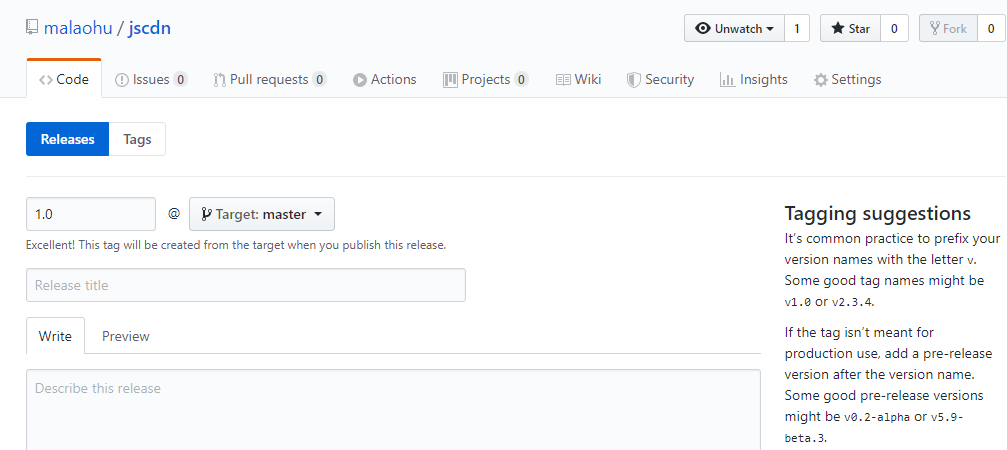
例:加载 jQuery v3.2.1
https://cdn.jsdelivr.net/gh/jquery/jquery@3.2.1/dist/jquery.min.js
PicGo使用
创建 Github 仓库,并获取 token,填入 PicGo 配置即可。PicGo 能够方便地将上传图片到 Github。
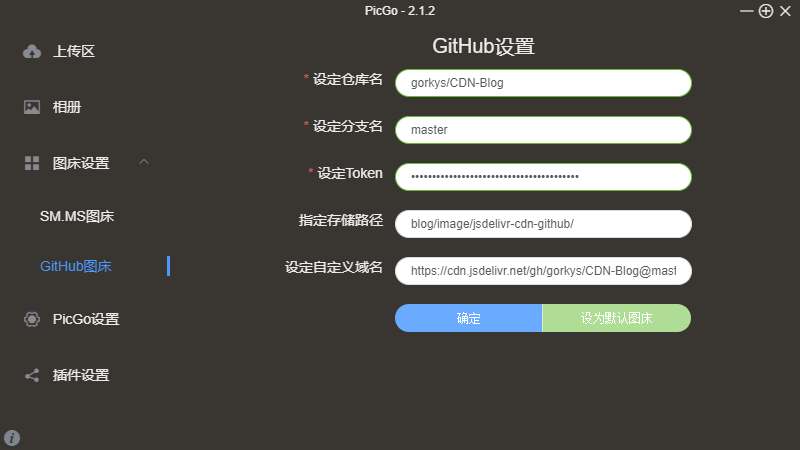
- 设定仓库名:填写你的仓库名称,格式:用户名/仓库名
- 设定分支名:仓库的分支名,一般填写master就行
- 设定Token:之前复制下来的token
- 指定存储路径:图片在仓库中的存储路径,blog/image/可自定义名称
- 设定自定义域名:访问图片的域名,例:https://cdn.jsdelivr.net/gh/user/CDN-Blog@master
限制:
目前GITHUB仓库容量是没有上限的!不过官方推荐在1G以内。
仓库单个文件50M会收到警告,大于100M会被拒绝。
在国内有网宿CDN加速访问。
在国外有CloudFlare CDN加速访问。
jsdelivr 加速限制:File size exceeded the configured limit of 20 MB.
Github关于储存库容量的限制: https://help.github.com/cn/github/managing-large-files/what-is-my-disk-quota
参考:
https://51.ruyo.net/15149.html
https://www.sitstars.com/archives/78/
https://blog.iljw.me/2019/05/jsdelivr-cdn-github.html
https://tingtas.com/posts/4341d485
